
A practical profile-management guide for turning accurate business information into a clearer path to qualified inquiries.
A prospective client opens your Google Business Profile. Before visiting the website, that person wants to know whether your firm handles the right kind of matter, where the office is, and how to reach someone. Optimization should make those decisions easier—not merely make the profile look busy.
Start with a legitimate, verified profile, accurate categories and office details, a compliant review process, and working contact paths. Then evaluate whether the people finding the listing are becoming qualified inquiries. Posting more frequently is not a substitute for fixing the wrong phone number or an unsuitable primary category.
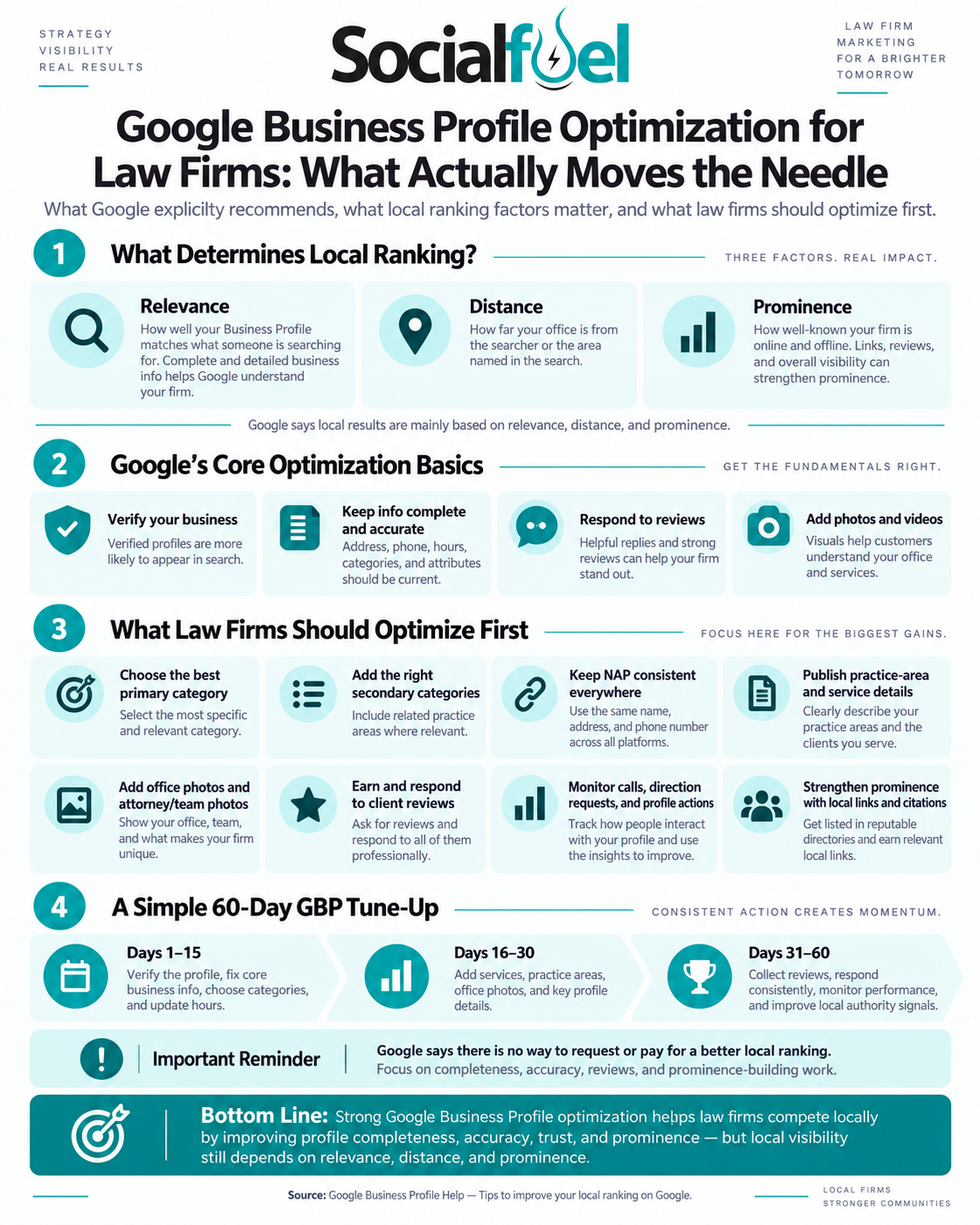
Google says local results mainly reflect relevance, distance, and prominence. Complete information helps explain what the business does; links, review volume, and positive ratings can
contribute to prominence. Google does not offer a way to request or purchase better organic local rankings. [1]
Separate ranking work from conversion work
Not every useful profile improvement has the same job. We recommend sorting the work into three groups rather than treating every field as a ranking switch.
Priority What to work on The practical purpose
- Access and accuracy
- Ownership, verification, office eligibility, name, address, and phone.
- Keep the listing manageable and prevent misleading information.
- Relevant discovery Appropriate categories, services, and a matching website destination.
- Trust and action Real photos, professional review handling, clear hours, and reliable intake.
- Explain which searches and prospective clients fit the practice.
- Help a visitor decide whether and how to contact the firm.
This is our implementation framework, not a Google scoring formula. A useful change may improve the client experience without producing an immediate ranking increase.
-
Keep ownership and verification under the firm’s control
Find the existing listing before creating another. Google provides a claim-and-verification process, and the available verification methods are determined by Google rather than chosen
freely by an agency. Complete the options shown for the actual business; do not build a campaign around a promised verification shortcut. [2]
Keep an authorized person at the firm as primary owner and invite an agency through an appropriate owner or manager role. Google supports separate account access without password sharing. [3] We recommend maintaining an access register with the profile link, responsible staff member, agency contact, and an offboarding procedure. When a vendor changes, your firm should not have to rediscover who controls its listing.
-
Represent the real office and the right practitioner
Use the real-world business name, not extra city names or service keywords. A rented mailing address where the firm does not operate is ineligible. A co-working office needs clear signage, customer access during business hours, and the firm’s own staff present during those hours. [4]
Google also has practitioner-specific rules. A separate attorney profile requires a public-facing lawyer directly reachable at that verified location during stated hours. Do not create separate profiles for each specialization. Firm and eligible practitioner profiles can be separate;
practitioner names should not incorporate the firm’s name. For a sole public-facing practitioner representing a branded organization, Google recommends a shared profile. [4]
Before adding listings, draw a simple inventory: real offices, existing firm profiles, attorney profiles, and the people responsible for each. Investigate apparent duplicates before removing anything. The objective is accurate representation, not the largest possible profile count.
-
Choose categories for the business you actually run
Google explicitly says categories affect local ranking. Select the most specific available primary category that accurately describes the core practice, then add only relevant additional
categories. Categories come from Google’s list; you cannot invent one. A category edit may trigger another verification request. [5]
For example, an immigration-focused firm should examine the available immigration-specific category rather than automatically using a broad legal category. A genuinely multidisciplinary practice needs a category choice that reflects its main business—not whichever specialty appears most valuable in a keyword tool. Confirm the current choices inside the profile before publishing.
Keep the distinction clear: categories describe the business; services describe the work it offers. Do not add every legal category to chase unrelated inquiries. Record the previous selection, the reason for changing it, and the date. That gives the firm a useful change history instead of a sequence of unexplained edits.
-
Make contact details and hours dependable
Treat the listing as the beginning of an intake path. Test the displayed phone number from a mobile device. Check where the call actually routes, whether a message can be left, and whether the return-call process works. Open the website link and submit a test inquiry using non-sensitive test information.
Google provides regular hours, Special hours for exceptions such as holidays, and certain additional service-hour options. [6] Keep those details aligned with the real customer experience. A third-party answering service operating overnight is not, by itself, evidence that
clients can visit the office overnight. Google’s representation rules call for customer-facing hours; appointment-only businesses are generally directed not to display main hours. [4]
For a single-office firm, the homepage may be the right website destination. For multiple offices, we recommend a substantive location page that identifies the correct team, address, services, directions, and contact options. Choose the destination that helps the person using that particular listing; do not send everyone to an unrelated campaign page.
-
Write a useful description and specific services
Google’s business-description field permits up to 750 characters. Use it to explain the practice
and relevant differentiators, not to repeat a search phrase. URLs and HTML do not belong in that field, and the focus should be the business rather than promotions or prices. [7]
A practical drafting order is: the matters you handle, the people or businesses you serve, the actual office area, and one or two verifiable reasons to consider the firm. Mention languages or appointment arrangements only when accurate. Avoid unsupported superlatives such as “the best,” invented credentials, or promises about outcomes.
Where the services editor is available, add the real services offered. Google allows suggested and custom services, including descriptions, and says a matching service may be highlighted
when someone searches. Service names should not contain phone numbers, prices, or irrelevant text. [8]
For a family-law practice, for example, divorce, custody, and support work should be distinguished where the firm actually handles them. Describe what someone can ask the firm about rather than turning each service into the same paragraph with a different keyword. Have the responsible attorney approve legal descriptions before publication.
-
Build an honest review process—not a five-star filter
Google allows businesses to request reviews through a review link or QR code and encourages professional replies. It also advises protecting privacy and moving complex concerns to a private channel. [9] We recommend a consistent, neutral request at an appropriate point in the client experience, with no pressure to disclose matter details or participate.
Do not offer payment, discounts, or gifts for reviews. Do not send only satisfied clients to Google while diverting everyone else to a private form: Google prohibits selectively soliciting positive reviews and discouraging negative ones. Its policy also prohibits pressuring reviewers to include specified content. [10]
For attorneys, a reply needs a confidentiality check as well as a tone check. Our conservative approach is to avoid confirming representation or discussing case facts in public, and to require attorney approval for sensitive responses. A possible starting point is: “We take feedback seriously. Please contact our office directly so the appropriate team member can review your concern.” Adapt it to the situation and applicable professional rules; it is not universal legal advice.
A negative review is not automatically removable. Flag an actual policy violation, preserve relevant evidence, and pursue the appropriate process rather than promising deletion.
Separately, look for operational themes: unanswered calls, scheduling confusion, or unclear next steps deserve attention even when the review remains. [9]
-
Use real photos and purposeful updates
Google says exterior photos can help visitors recognize the business and supports uploading office photos and videos after verification. [11] For a law firm, start with the real entrance, suite signage, reception area, and approved team photos. Check backgrounds for client files and sensitive information. Use the actual office—not a stock interior or an invented skyline that creates the wrong expectation.
Posts can communicate announcements, events, and business updates on Search and Maps. [12] Use them to share a useful new guide, an office-access change, or a relevant community event. Give each update one purpose and a working next step. A fresh post cannot compensate for an incorrect address or a broken intake form.
Set a publishing cadence the firm can sustain. We do not treat a daily-post quota or a fixed
photo count as a guaranteed ranking strategy: Google’s cited guidance describes their customer-information role, not a promised ranking increase for a publishing schedule. [11][12]
-
Measure inquiries, not just profile activity
Business Profile performance can show search terms, views, directions requests, website clicks, and other available interactions. Crucially, its Calls metric counts call-button clicks, not
confirmed conversations or signed matters. Google also says performance data can include activity from both organic results and Google Ads. [13]
Use those numbers as the beginning of the analysis. Our recommended intake record distinguishes new prospects from existing clients and spam, then tracks qualified inquiries, consultations, and signed matters. A chart showing more call clicks is not proof that more suitable clients reached the firm.
For website visits, campaign parameters can identify traffic in Google Analytics. [14] One proposed convention for an organic Houston profile link is utm_source=google, utm_medium=organic, and utm_campaign=gbp_houston. The campaign name is our example, not a Google requirement. Keep naming consistent and test the full destination URL before saving it.
Compare like-for-like periods and review the change log alongside intake results. Separate paid activity where possible, note seasonality, and acknowledge that a single rise or fall does not prove causation. Ask a business question: are the right prospective clients finding the right office and successfully reaching the right person?
A practical 60-day profile improvement plan
Use this as an implementation schedule, not a promise of rankings within 60 days. Resolve verification or eligibility problems before expanding promotional activity.
Window Work to complete Evidence to keep
- Days 1–15 Confirm access and verification; review real office and practitioner eligibility; correct categories, core details, and hours.
- Days 16–30 Improve description and services; add real photos; check the website destination; establish review and response procedures.
- Days 31–60 Publish useful updates; monitor edits and reviews; evaluate profile activity against qualified inquiries and intake outcomes.
- Profile inventory, dated baseline, access register, and tested contact paths.
- Attorney-approved copy, image approvals, review-request wording, and test inquiries.
- Change log, comparable reporting periods, completed work, and next priorities.
After the initial cleanup, assign an owner for weekly checks and a monthly review. We recommend checking contact details, hours, new reviews, failed links, pending changes, and the next useful update. Ongoing management should leave a visible record of completed work—not simply a report saying the profile was “optimized.”
Frequently asked questions
Will a complete profile guarantee a top-three position?
No. Completeness helps Google and prospective clients understand the firm, but relevance,
distance, and prominence still interact. A provider cannot buy an organic local position from Google. [1]
Is adding every practice area the best category strategy?
No. Choose categories that accurately describe the actual business. Put detailed offerings in the services section where appropriate, and keep both aligned with the firm’s real work. [5][8]
Should every attorney have a separate listing?
Not automatically. Apply Google’s public-facing-practitioner and direct-contact requirements to the real office arrangement before creating profiles. [4]
How can I tell whether optimization is helping?
Look beyond impressions. Review relevant searches and profile interactions, then reconcile them with your own intake records. Track what changed and compare equivalent periods; call-button clicks alone do not establish lead quality or case volume. [13]
Where SocialFuel fits
SocialFuel’s Law Firm Local SEO service includes Google Business Profile management at $3,000 per month, month to month. The approved scope combines initial audits and competitor research, ongoing profile work, six monthly profile updates such as posts or review
responses, website content work, local link-building campaigns, and reporting. It covers one primary office; additional locations are scoped separately. [15]
For clients whose existing Google profile is below 4.5 stars, the separate Law Firm Reputation Management service is required at $1,500 per month, bringing that combination to $4,500 monthly. This threshold is SocialFuel’s service requirement, not a Google eligibility rule. Major
technical repairs and redesigns are separate, and rankings, leads, ratings, and review removal are not guaranteed. [15]
The value of management is coordinated execution: someone owns the access, maintains accurate information, documents changes, and connects visibility to the intake process. Review Law Firm Local SEO and buy online when the scope fits the work your firm needs.
| Bottom line: Make the profile accurate, relevant, credible, and easy to act on. The goal is not maximum activity—it is fewer obstacles between a suitable local search and a qualified conversation with your firm. |
Sources and implementation notes
External sources checked September 9, 2026. Google’s platform features and review processes can change. The workflow, examples, and measurement recommendations are SocialFuel’s editorial guidance, not Google ranking guarantees. Service pricing follows the approved 2026 Local SEO materials. The firm should approve legal claims and review responses under its applicable professional obligations.
1. Google Business Profile Help — Tips to improve your local ranking on Google
2. Google Business Profile Help — Verify your business on Google
3. Google Business Profile Help — Manage your Business Profile owners & managers
4. Google Business Profile Help — Guidelines for representing your business on Google
5. Google Business Profile Help — Manage your business category
6. Google Business Profile Help — Edit your business hours
7. Google Business Profile Help — Edit your Business Profile
8. Google Business Profile Help — Manage your services on your Business Profile
9. Google Business Profile Help — Tips to get more reviews
10. Google Maps — Prohibited & restricted content
11. Google Business Profile Help — Manage your Business Profile photos & videos
12. Google Business Profile Help — Create & manage posts on your Business Profile
13. Google Business Profile Help — Understand your Business Profile performance
14. Google Analytics Help — URL builders: Collect campaign data with custom URLs
[15] SocialFuel, “Law Firm Local SEO,” approved 2026 service sheet, pages 1–2. Pricing and scope source; service-specific written terms apply.